
One feature you might find on your cell phone camera is the HDR setting. IPhones have had it for years, and I see that the latest Galaxy phones as well as Google Pixels have it, too. HDR stands for High Dynamic Range. What it does is that it gives a better range of color values in your pictures. For instance:
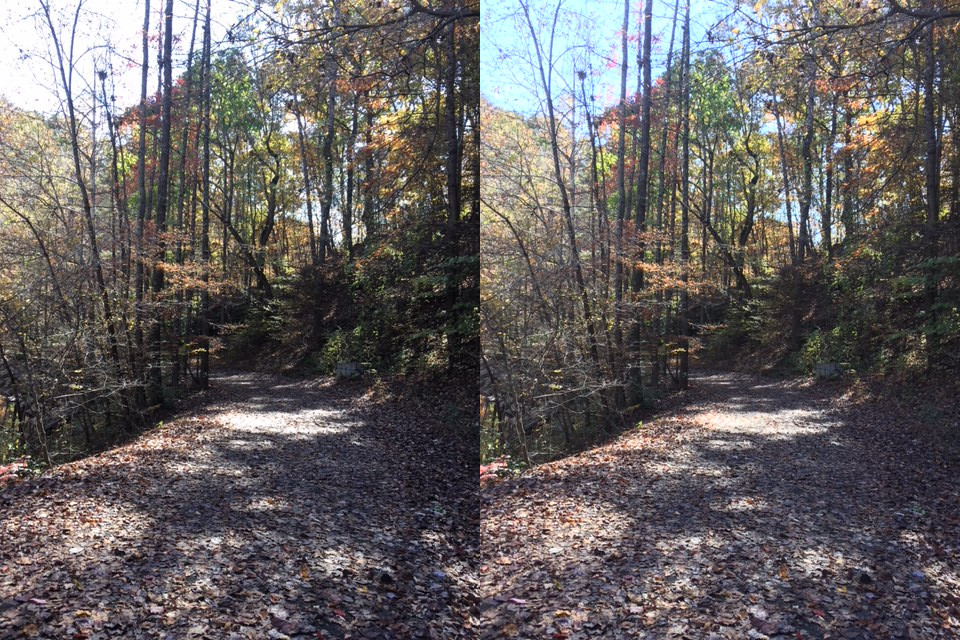
In this image that I took with my IPhone, I had the HDR setting enabled. It recorded both a regular image (left) and an HDR image (right). At first glance the two images look the same, but if you look at the sky, you’ll see that it was totally washed out in the regular image. Whereas, in the HDR image you’ll see that the blue of the sky has returned. If you look even closer you will see that the dark areas are a little less lost in shadow as well.
It’s a subtle change, but such small differences can make the difference between a good photograph and a great photograph.
On IPhones, you enable the HDR setting directly in the camera app in two touches, first select “HDR” at the top or side (depending on the orientation, then select “On” :
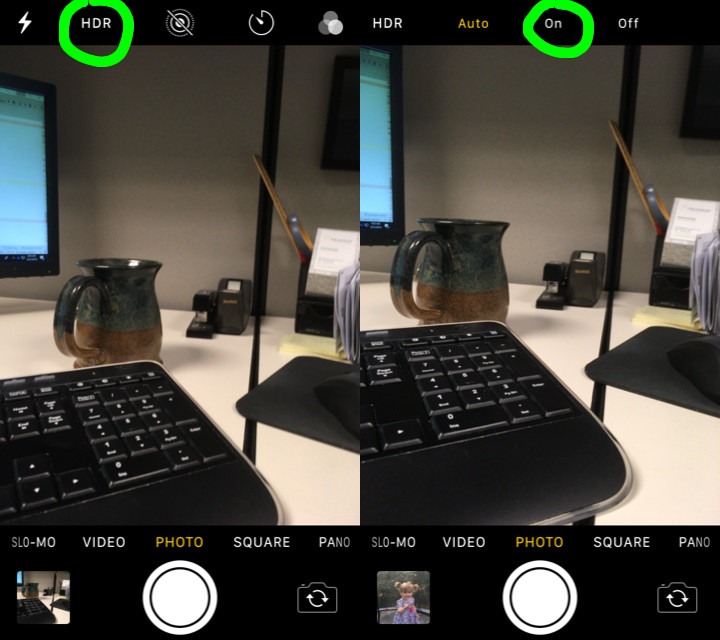
You may have noticed the “Auto” option. That’s on newer IPhones and, in theory at least, has the IPhone determining when best to take an HDR photo. I tend to not trust the auto feature, and prefer to force the HDR setting to on.
There is one other setting on the IPhone involved with HDR. If you go into the Settings app and down to the camera settings, there is a toggle switch that you can enable to keep both an HDR and non-HDR version of any photos you take while the HDR setting is enabled. I suggest keeping this toggle on as sometimes, the non-HDR photo turns out to be the better of the the two.
Yours in Art,
Daniel
P.S. If you liked this article and don’t want to miss any future articles, please subscribe to my mailing list. I’ll send you all of my best art and articles.